Lab 2: Threads and Message Queue
Purpose
Create your first tasks in Zephyr, exploring different options for creating tasks and passing in data and communication structures that your tasks might need to operate.
Overview
Zephyr allows the engineer to quickly and effectively create a task to be run by the scheduler system. Tasks can be created at compile time or at runtime and assigned priorities to help determine importance to the system.
When creating tasks, it’s important to minimize “busy wait” or blocking functions where the scheduler may have difficultly taking control from the task.
We’ll also create a message queue that will be used to deliver data from one task to another, and learn how to allow the tasks to access the message queue.
Procedure
Along the way in this lab, you may notice some compiler warnings when you build. These are due to the interative nature of this lab. By the time Lab 2 is complete all compiler warnings will be cleared!
Step 2.1: Create a Producer Thread
2.1.1: In the application/src/ folder, create a new file called producer.c, adding the following content:
#include <zephyr/kernel.h>
#include <zephyr/drivers/gpio.h>
#include "producer.h"

void producerThread(void *inLed, void*, void*) {
      struct gpio_dt_spec *toggleLED = (struct gpio_dt_spec*)inLed;
      bool led_state = true;
      int counter = 0;
      uint32_t data = 0;

    while (1) {
        gpio_pin_toggle_dt(toggleLED);
        led_state = !led_state;
        k_msleep(SLEEP_TIME_MS);
    }
}
Notice that this function takes three void pointers and returns void. All Zephyr tasks must match this prototype. Void pointers can be cast to a useful type within the function as shown in this example. It’s a good idea to create objects at a higher level and pass them in via this technique (called dependency injection) if multiple tasks need to share resources.
Zephyr provides a special delay function k_msleep() that allows the individual task to wait for the specified timeout (in milliseconds) while allowing the scheduler to service other tasks within the system. If you need a delay, always use this sleep function (or one of its siblings – k_sleep(), k_usleep(), k_yield(), or k_busy_wait() [if you truly need a blocking delay])
2.1.2: : In the application/src/folder, create a file called producer.h with a define for SLEEP_TIME_MS and a prototype for producerThread():
#define SLEEP_TIME_MS     100
void producerThread(void* inLed, void*, void*);
2.1.3: From the top of main.c, remove the #define SLEEP_TIME_MS 500 to prevent a redefine. Further down in main(), delete the instantiation of bool led_state = true; since we moved this part of the application to producer.c.
#include <zephyr/drivers/gpio.h>

#define SLEEP_TIME_MS 500

...

int main(void) {
	int ret;
	bool led_state = true;

	if (!gpio_is_ready_dt(&led)) {
		return 0;
	}
2.1.4: Update CMakeLists.txt to add producer.c as a build target and expose the src/ directory as an include path:
target_sources(app PRIVATE src/main.c src/producer.c)
target_include_directories(app PRIVATE src)
target_include_directories(app PRIVATE src) tells CMake to add the src/ folder to the
compiler's header search path. This is what allows #include "producer.h" (and later
#include "consumer.h") to resolve without an explicit relative path prefix. Notably, this is relative to the CMakeLists.txt file, hence why we are not using application/src/.
If you prefer to store your include files elsewhere in the file tree, you are free to do so. Just be
sure to update this line in CMakeLists.txt accordingly. In any case, the linker will now be able to find any .h files that are added to this directory.
2.1.5: Replace the while(1) loop body in main.c with a simple sleep so that main() yields the CPU once threads are running:
while(1) {
    k_msleep(SLEEP_TIME_MS);
}
2.1.6: In main.c, include producer.h by adding the following line towards the top of the file:
#include <stdio.h>
#include <zephyr/kernel.h>
#include <zephyr/drivers/gpio.h>
#include "producer.h"
2.1.7: Still in main.c, use the following compile time macro to create a stack space for the task by adding the following code before main();
/* The devicetree node identifier for the "led0" alias. */
#define LED0_NODE DT_ALIAS(led0)

/*
 * Zephyr Thread defines
*/

#define STACKSIZE 1024
#define PRIORITY 7
K_THREAD_STACK_DEFINE(producerThreadstack_area, STACKSIZE);
struct k_thread producerThread_data;
2.1.8: Initialize the task in main() right before the while(1){} loop:
    ret = gpio_pin_configure_dt(&led, GPIO_OUTPUT_ACTIVE);
	if (ret < 0) {
		return 0;
	}

    k_tid_t producer_tid = k_thread_create(&producerThread_data,
                            producerThreadstack_area,
                            K_THREAD_STACK_SIZEOF(producerThreadstack_area),
                            producerThread,
                            (void*)&led, (void*)NULL, (void*)NULL,
                            PRIORITY, 0, K_NO_WAIT);

    while (1) {
        k_msleep(SLEEP_TIME_MS);
    }
2.1.9: Build and flash your new code using west flash. The LED should toggle every 100ms. (10Hz)
- Ubuntu
- macOS
- Windows
(.venv) $ west flash --openocd openOCD-wireless/prebuilt_binaries/linux/bin/openocd
(.venv) $ west flash --openocd openOCD-wireless/prebuilt_binaries/macos/bin/openocd
(.venv) PS C:\...\zephyrproject> west flash --openocd openOCD-wireless\prebuilt_binaries\windows\openocd_support_wbz_pic32wm\bin\openocd.exe
Step 2.2: Create a Consumer Thread
2.2.1: In the application/src/ folder, create a new file called consumer.c, adding the following content:
#include <zephyr/kernel.h>
#include "consumer.h"

void consumerThread(void*, void*, void*){
    uint32_t data = 0;

    while (1) {
        k_msleep(1000); // 'Magic Number' OK – We'll replace shortly
        printk("(consumer) Data: %d\n", data);
        data++;
    }
}
2.2.2: In the application/src/ folder, create a filed called consumer.h with a prototype for consumerThread():
void consumerThread(void*, void*, void*);
2.2.3: In main.c, follow the steps you learned previously to instantiate and run your new task with its own stack space and TID:
2.2.3.1: Include the header file for your new task at the top of main.c
#include <zephyr/drivers/gpio.h>
#include "producer.h"
#include "consumer.h"
2.2.3.2: Add the consumer.c file to the CMakeLists.txt target_sources
target_sources(app PRIVATE src/main.c src/producer.c src/consumer.c)
2.2.3.3: In main.c, create a stack area in memory for your thread (you can use the same #define STACKSIZE that you used for Producer Thread) and create a new variable to hold your thread data:
/*
 * Zephyr Thread defines
*/
#define STACKSIZE 1024
#define PRIORITY 7
K_THREAD_STACK_DEFINE(producerThreadstack_area, STACKSIZE);
struct k_thread producerThread_data;
K_THREAD_STACK_DEFINE(consumerThreadstack_area, STACKSIZE);
struct k_thread consumerThread_data;
2.2.3.4: Call k_thread_create() with your new thread’s information, being sure to check that you are passing expected void pointers – in this case, (void*)NULL for all three members
    k_tid_t producer_tid = k_thread_create(&producerThread_data,
                            producerThreadstack_area,
                            K_THREAD_STACK_SIZEOF(producerThreadstack_area),
                            producerThread,
                            (void*)&led, (void*)NULL, (void*)NULL,
                            PRIORITY, 0, K_NO_WAIT);
    k_tid_t consumer_tid = k_thread_create(&consumerThread_data,
                            consumerThreadstack_area,
                            K_THREAD_STACK_SIZEOF(consumerThreadstack_area),
                            consumerThread,
                            (void*)NULL, (void*)NULL, (void*)NULL,
                            PRIORITY, 0, K_NO_WAIT);
    while (1) {
        k_msleep(SLEEP_TIME_MS);
    }
2.2.3.5: Build and flash your code, examining the output in Serial Monitor. You should see output from both tasks appear in your console.
Step 2.3: Create a Message Queue
2.3.1: In main.c – just before the main() function, declare a new global variable to hold the Message Queue and a buffer that will hold the number of queue items we wish to include (in this case, our buffer will hold a maximum of 4 32-bit queue items):
static const struct gpio_dt_spec led = GPIO_DT_SPEC_GET(LED0_NODE, gpios);

struct k_msgq consumerQueue;
char taskCommsBuffer[4 * sizeof(uint32_t)];

int main(void) {
    ...
2.3.2: Initialize the Message Queue in main() before your thread creation by calling k_msgq_init():
int main (void) {

    ...

    k_msgq_init(&consumerQueue, taskCommsBuffer, sizeof(uint32_t), 4);

    k_tid_t producer_tid = k_thread_create(...
2.3.3: Update producer.c/h prototypes of producerThread() to take the MessageQueue pointer as its second argument, as so:
void producerThread(void *inLed, void* inMsgQueue, void*)
2.3.4: Allow producer.c:producerThread to use this Message Queue by casting the void pointer in producerThread() just below where inLED is cast to struct gpio_dt_struct:
void producerThread(void *inLed, void* inMsgQueue, void*) {
       struct gpio_dt_spec *toggleLED = (struct gpio_dt_spec*)inLed;
       struct k_msgq *notifyMsgQueue = (struct k_msgq*)inMsgQueue;
2.3.5: In producer.c, add the following block of code within the while(1){} loop to periodically place data into the message queue:
    led_state = !led_state;
    if(counter++>=10) {
        printk("(producer) Putting %d into message queue\n", data);
        k_msgq_put(notifyMsgQueue, &data, K_NO_WAIT);
        data++;
        counter = 0;
    }

    k_msleep(SLEEP_TIME_MS);
The data we’ve chosen to pass in this example isn’t particularly useful, but you can easily imagine an ADC collecting data and passing a rolling average value to other threads periodically
2.3.6: In main.c, update your k_thread_create() call to take the &consumerQueue pointer (created in step 1) as its second (void*) argument to match your updated producerThread() prototype
producer_tid = k_thread_create(&producerThread_data,
                producerThreadstack_area,
                K_THREAD_STACK_SIZEOF(producerThreadstack_area),
                producerThread,
                (void*)&led, (void*)&consumerQueue, (void*)NULL,
                PRIORITY, 0, K_NO_WAIT);
2.3.7: Similarly, update consumer.c/h:
2.3.7.1: Accept (void*)inMsgQueue as its second argument for consumerThread() prototype:
void consumerThread(void*, void* inMsgQueue, void*)
2.3.7.2: In consumer.c cast the incoming (void*) inMsgQueue pointer for use within the consumerThread function
void consumerThread(void*, void* inMsgQueue, void*) {
    struct k_msgq *notifyMsgQueue = (struct k_msgq*)inMsgQueue;
    uint32_t data = 0;

	while (1) {
        ...
2.3.7.3: In consumer.c replace the k_msleep() command in consumerThread with a command to get a queue item in the message queue:
    while (1) {
        k_msleep(1000);
        k_msgq_get(notifyMsgQueue, &data, K_FOREVER);
        printk("(consumer) Received data: %d\n", data);
    }
K_FOREVER seems like a long time. If your thread needs to wait that long for data, something
may have gone wrong. In the real world, you may want to time bound this function and raise an
error if the timer expires without a new queue entry showing up as expected.
2.3.7.4: In consumer.c remove the data++; incrementor from consumerThread(), as data is now being collected from the message queue and doesn’t need to be internally incremented
    while (1) {
        k_msgq_put(notifyMsgQueue, &data, K_NO_WAIT);
        printk("(consumer) Data: %d\n", data);
        data++;
    }
}
2.3.7.5: In main.c update your k_thread_create() call to take your &consumerQueue pointer as its second (void*) argument to match your updated consumerThread() prototype
consumer_tid = k_thread_create(&consumerThread_data,
                consumerThreadstack_area,
                K_THREAD_STACK_SIZEOF(consumerThreadstack_area),
                consumerThread,
                (void*)NULL, (void*)&consumerQueue, (void*)NULL,
                PRIORITY, 0, K_NO_WAIT);
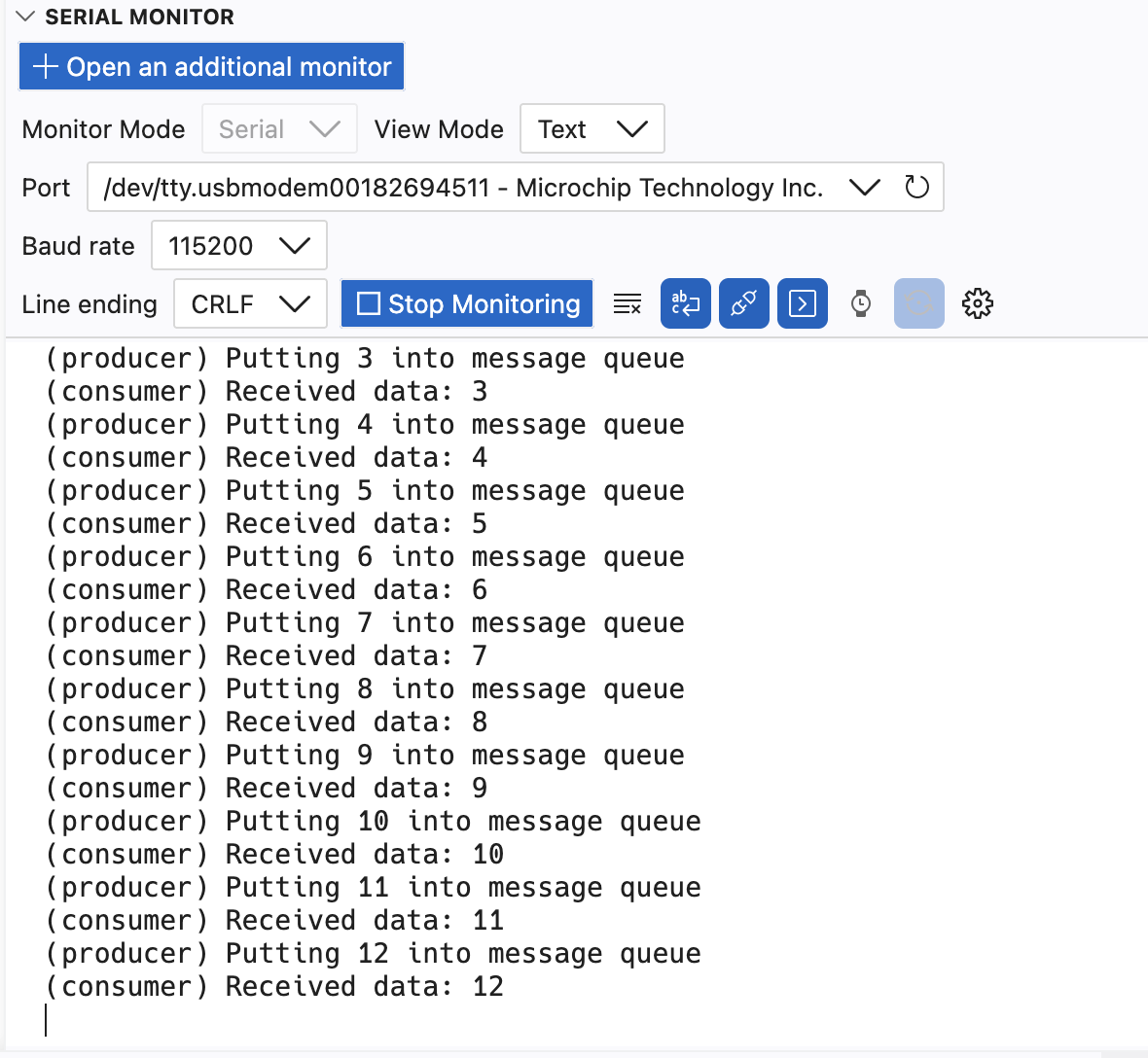
2.3.8: Build and flash your code, observing in SerialMonitor that the value of “counter” in producerThread() is now delivered to consumerThread() via the shared message queue, and consumerThread now prints out the value whenever a new queue item is received.
Results
Congratulations! You have completed Lab 2. Your device is now running two Zephyr OS tasks with a Message Queue to deliver data from one to the other!
Summary
Managing tasks and inter-task communication are essential skills for building RTOS applications. In this lab you created two tasks and passed data between them using a message queue. Zephyr also supports many other communication methods. Browse the Zephyr API docs to learn more!